
You are in the middle of a pull, you press your interrupt, and nothing happens for half a second. The cast goes off, the tank eats it, and your spell finally fires into a dead cast bar. That delay has a name, and in World of Warcraft it usually shows up as a high world latency number even when your internet feels perfectly fast everywhere else.
Here is the part most guides skip: high latency in WoW is almost never about how fast your connection is. You can have gigabit fiber and still sit at 400 ms world latency, because the problem is the route your data takes to the realm server, not the size of the pipe. This guide walks through how to read the two ping numbers WoW shows you, the fixes that genuinely move the needle, and an honest answer to the question everyone eventually asks: do I need a VPN or a paid ping reducer?
First, Read the Two Numbers WoW Gives You
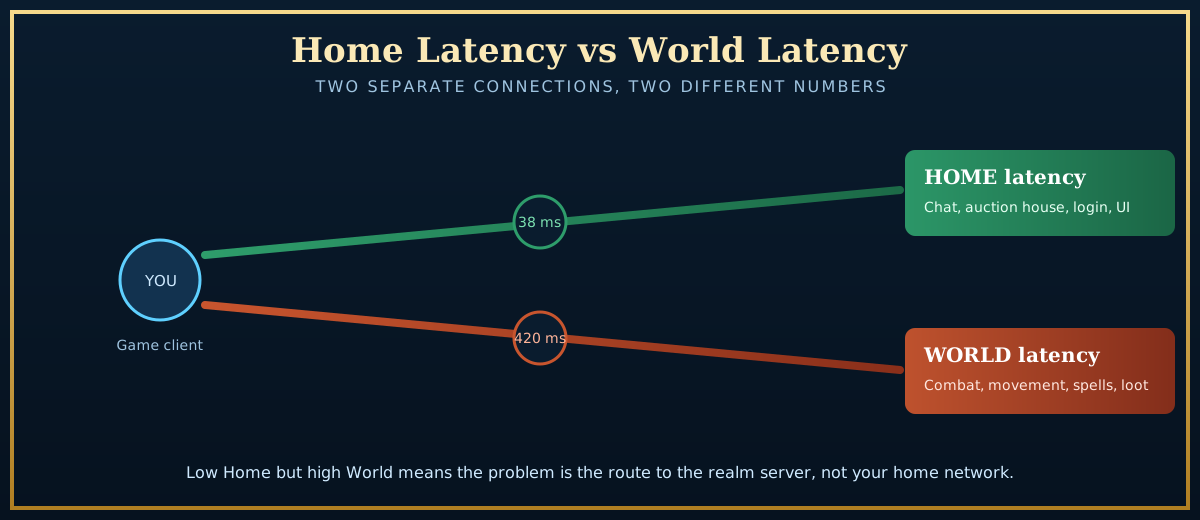
Since patch 4.0.6, WoW has reported two separate latency values, and confusing them is the single most common reason people chase the wrong fix. Hover your mouse over the latency icon (the small bars next to your frame rate, or open the Game Menu and look at the bottom) and you will see a tooltip with both:
- Home latency covers the lighter connection: chat, the auction house, login, guild messages, and most of the user interface. When home latency is high, your whole experience feels sticky, including menus.
- World latency covers the heavy connection: combat, movement, casting, looting, and anything that happens in the game world. This is the number that matters for raiding, Mythic+, PvP, and dodging mechanics. Far more data travels over this connection, so it is the one that spikes.
The diagnosis writes itself once you compare them:
- Home low, World high: the classic case. Your home network is fine. The route from you to the realm server is congested or badly peered. This is the situation a ping reducer can sometimes fix, and where most of this guide is aimed.
- Both high: the problem is closer to home: your Wi-Fi, your router, your ISP's local node, or a background app eating bandwidth.
- Both fine but the game still stutters: that is not latency at all, it is frame rate. Low FPS feels like lag but it is a graphics and CPU problem, and no amount of network tuning will help. Skip to the FPS section near the end.
The Free Fixes That Actually Help (Do These First)
Before you spend a cent, work through this list in order. Most players never get past step three.
1. Get on a wired connection
Wi-Fi is the number one cause of random WoW lag spikes. Even a strong signal introduces jitter, and a microwave, a neighbor's router, or someone streaming in the next room can spike your world latency for a few seconds at exactly the wrong moment. A single Ethernet cable from your PC to the router removes more lag problems than every software tweak combined. If running a cable is impossible, a pair of powerline adapters is the next best thing and beats Wi-Fi for stability.
2. Toggle "Optimize Network for Speed"
WoW has a built in setting that changes how often the client and server exchange packets. Find it under Game Menu > System > Network > Optimize Network for Speed.
This one is not a simple "turn it on" switch. Enabling it tells the game to send updates more frequently, which lowers the felt input delay on a fast, stable connection. On a slower or flaky connection it can make things worse by flooding a link that cannot keep up. The honest advice is to test both states: tick it, play for a session, untick it, play another, and keep whichever feels smoother for you. There is no universal correct answer.
3. Stop background bandwidth from competing
The Battle.net app keeps downloading and patching in the background, and it will happily saturate your upload while you raid. In the Battle.net app, open the settings, go to Downloads, and cap or pause background downloads while you play. Then close the obvious offenders: cloud backups, system updates, OneDrive or Dropbox syncing, and any other device in the house pulling a big download. Game traffic is tiny but extremely time sensitive, so a single large transfer elsewhere can wreck your world latency.
4. Reset the path with a quick power cycle
Unplug your router and modem for thirty seconds and plug them back in. This sounds like a help desk cliche, but it genuinely forces your ISP to hand you a fresh route, and a surprising number of "sudden high latency this week" cases clear up the moment the connection re-establishes through a less congested path.
5. Flush DNS and disable IPv6 if it is misbehaving
On Windows, open Command Prompt and run ipconfig /flushdns. If your world latency only went bad recently, a stale DNS or a flaky IPv6 route can be the culprit. Some players see steadier ping after forcing IPv4, though this is connection specific, so treat it as an experiment rather than a guaranteed win.
Diagnose the Route Before You Blame Blizzard
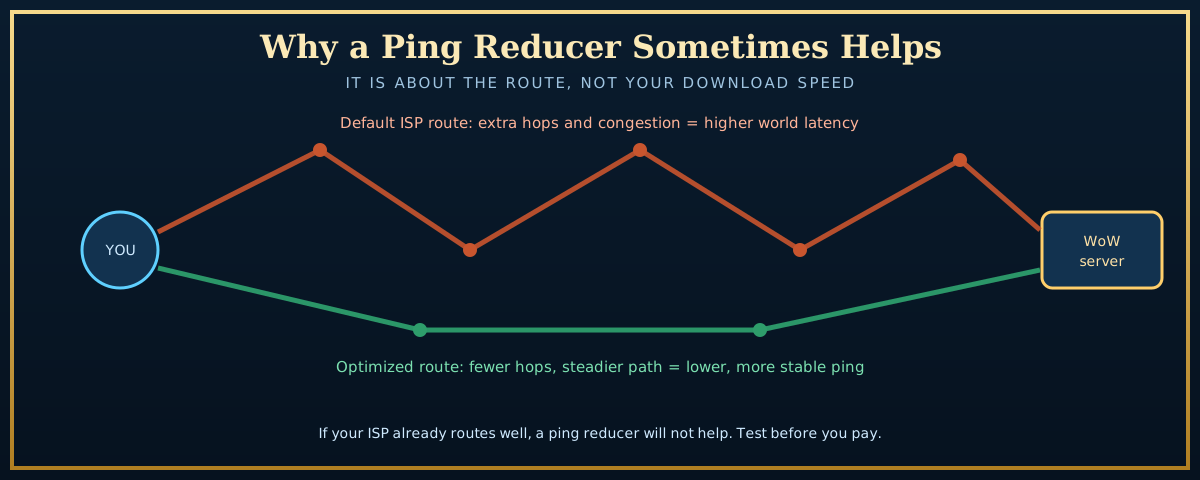
If the free fixes did not help and your world latency is still high with home latency low, you have a routing problem. Before paying for anything, prove it. The free tool WinMTR (or a terminal traceroute) shows every hop between you and the server and where the delay or packet loss appears. Run it against your realm's data center address while the game feels laggy.
What you are looking for: a specific hop, usually a few steps out from your house, where the latency jumps and stays high, or where packets start getting dropped. If the bad hop is on your ISP's network, you have a real support ticket to file. If it is at a peering point between your ISP and the game's host, that is exactly the situation a ping reducer is built to route around. Blizzard also posts known incidents on its service status pages, so check there first before assuming the fault is on your end.
For a deeper reference on how WoW measures these connections, the community-maintained Wowpedia latency page documents the home and world split in detail, and Blizzard's own WoW support hub has the current connection troubleshooting steps.
Do You Actually Need a VPN or Ping Reducer for WoW?
This is the question with the most marketing noise around it, so here is the straight version.
A VPN or ping reducer for WoW does exactly one useful thing for latency: it sends your game traffic down a different, often more direct route to the server than your ISP would choose on its own. That is it. It cannot make light travel faster, and it cannot fix a problem that lives inside your own house. So the rule is simple:
- It can help when your world latency is high, your home latency is low, and a traceroute shows the delay sitting at an ISP peering point or on a long detour to a distant region. This is common for players far from their realm's data center, and for regions where ISP routing to the game host is genuinely poor.
- It will not help when your ISP already routes cleanly to the server, when the problem is your Wi-Fi or a background download, or when you are simply too far away geographically. In those cases a VPN often adds latency, because it is one more stop on the trip.
If you do decide to test one, the meaningful distinction is between a general privacy VPN and a purpose built gaming ping reducer. Privacy VPNs route all your traffic and rarely optimize for game latency. Gaming ping reducers like ExitLag, NoPing, and WTFast only touch your game packets and actively probe for the shortest route, which is why they tend to outperform a standard VPN for this specific job. Most of them offer a free trial, and that matters: the only honest way to know if one helps your connection is to run a before and after test on your own realm. If it does not measurably lower your world latency during the trial, cancel it and keep your money.
WoW Lag Spikes That Come and Go
Steady high latency and sudden lag spikes are different beasts. If your ping is fine for ten minutes and then jumps to 1500 ms for five seconds, work through these:
- Addons under load. A heavy combat addon, an out of date one, or a damage meter logging everything can cause hitches that feel like network lag during big pulls. Disable addons, test in a raid or dungeon, and reintroduce them in batches. Our guide to the best WoW addons for 2026 flags the lightweight, well maintained options worth keeping.
- Launch day and patch day congestion. Spikes that hit everyone at once, especially right after a content drop, are server side load, not your connection. There is nothing to fix locally except wait out the rush. If you are gearing up for a big release, the Midnight launch night checklist covers what to expect when realms are slammed.
- Wi-Fi interference and channel congestion. See the wired connection point above. Spikes that line up with someone else using the network are the giveaway.
- Background updates kicking in mid session. Windows Update, game launchers, and cloud sync love to start a large download at the worst moment. Schedule them outside your play hours.
When It Is Frame Rate, Not Latency
Worth repeating because it sends so many people down the wrong path. If both your latency numbers are healthy but the game still stutters, you have a performance problem, not a network one. Low and choppy frame rate feels identical to lag in the moment but the fix is completely different: lower your graphics settings (especially shadows, view distance, and particle density in crowded raids), update your GPU drivers, and make sure the game is actually using your dedicated graphics card.
Laptop and Mac players hit this most often, because integrated graphics and thermal throttling quietly cap your frame rate. If you are on Apple hardware, our breakdown of whether you can play World of Warcraft on a Mac covers the realistic performance you should expect and how to get the most out of it. And if your mouse feels sluggish even when ping is low, that is an input and polling question, not a network one, which our WoW mouse guide gets into.
The Quick Checklist
- Hover the latency icon and read home vs world. World high and home low means a routing problem.
- Switch to a wired connection before anything else.
- Test Optimize Network for Speed both on and off, keep the smoother one.
- Cap background downloads in Battle.net and close cloud sync apps.
- Power cycle the router and flush DNS to grab a fresh route.
- Run WinMTR to find the bad hop before paying for anything.
- Only try a VPN or ping reducer if the route is the proven culprit, and only keep it if a free trial measurably lowers your world latency.
- If both ping numbers are fine but the game stutters, fix your frame rate, not your network.
High latency in WoW feels like bad luck, but it is almost always a fixable routing or local network issue hiding behind a scary number. Work the free fixes first, prove where the delay lives with a traceroute, and treat paid tools as a last step you can verify rather than a magic button. Do that and you will spend far less, and your interrupts will actually land.
Want to keep your setup sharp from there? Browse the rest of our World of Warcraft guides for class, gold, and gear coverage that pairs well with a lag free connection.